Built for fastpitch softball. Ready for baseball.
Stop Missing Signs.
Start Winning Games.
Relay-9 turns the phone, earbuds, and watches you already own into a silent pitch and play calling system. Call the pitch on defense, call the play on offense, and let the built-in analytics tell you what is working.


Free 14-day trial on every plan. Cancel anytime.
Overcome the Noise.
Simplify the Game.
Wristband cards, shouted three-digit codes, and hand signs all fail the same way: walk-up songs, cheering parents, and the game on the next field drown them out, and the other dugout is charting every one of them.
Relay-9 sends the call point-to-point from your phone to your players' earbuds or watches. There is nothing for the other dugout to see, hear, or decode, and nothing for your battery to look up on a card. Your players focus on execution, not on deciphering signals.
Two Modes. One Tap. Every Call.
Flip between Defense and Offense during a live game without losing your place in either. Same phone, same watches, every call covered.
Call the Pitch
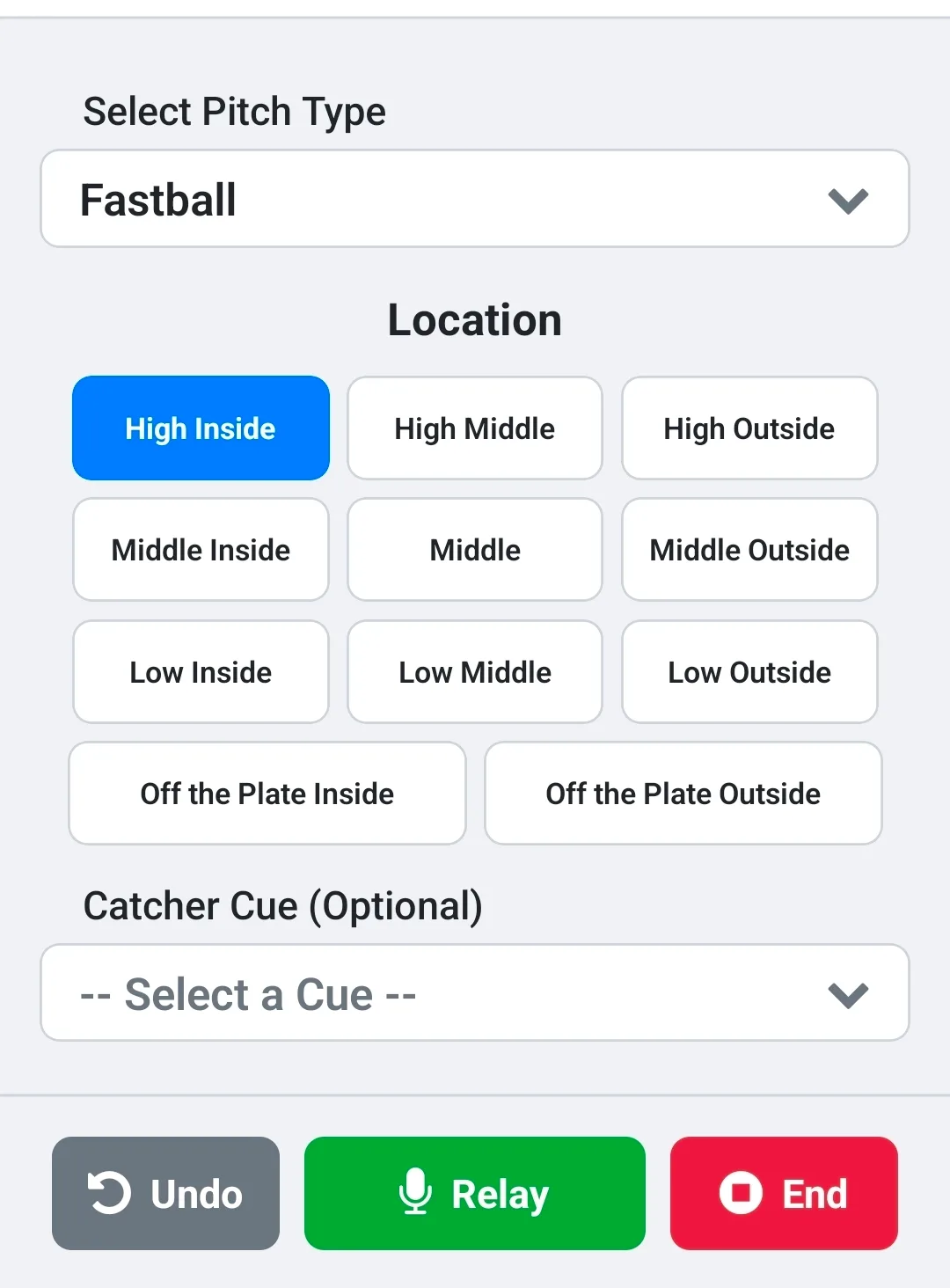
Tap the pitch, tap the location, add a catcher cue if you want one, and hit Relay. Your pitcher hears it or sees it before the batter is set.
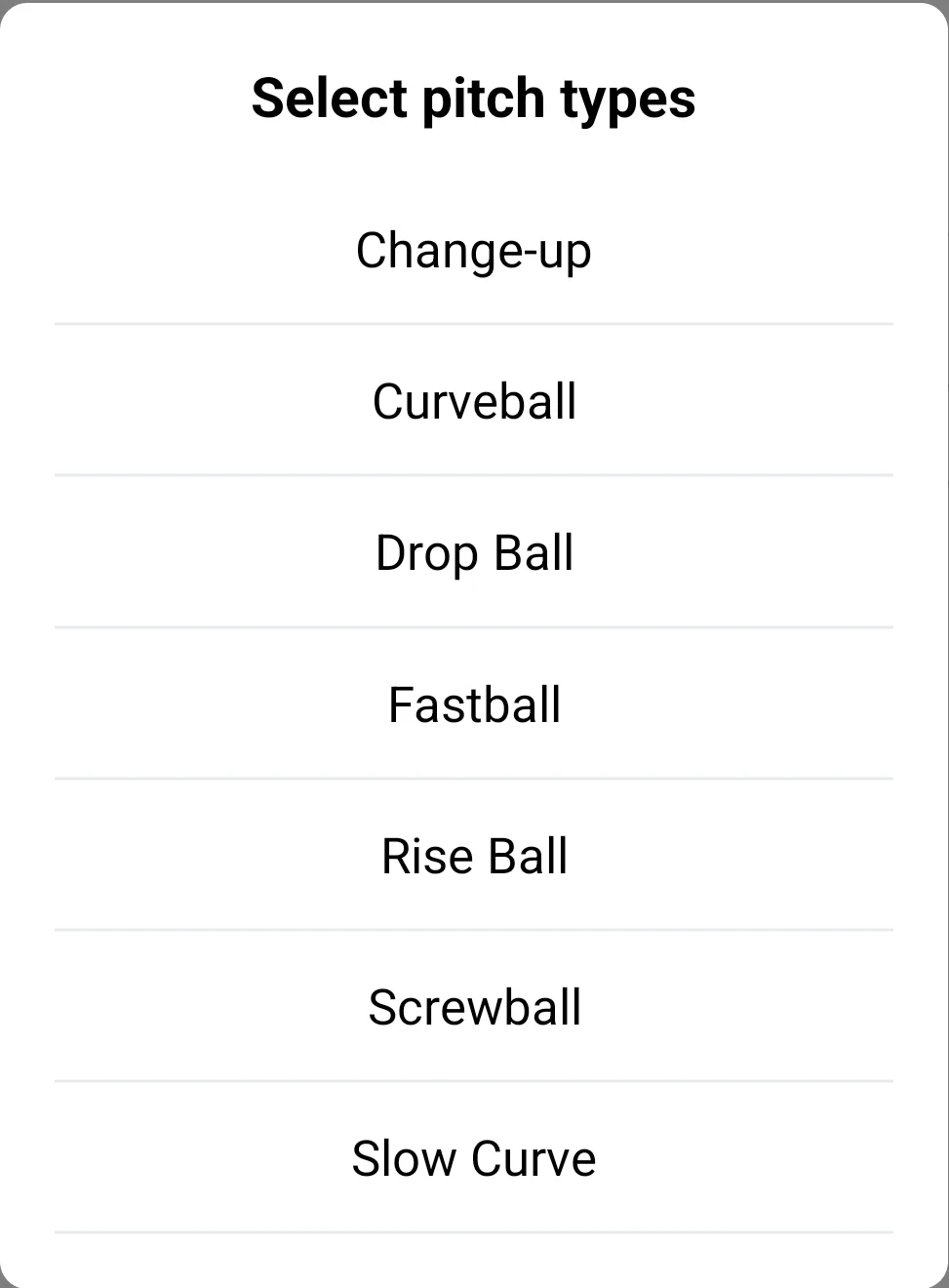
- Your pitch library. Fastball, Change-up, Curve, Slow Curve, Drop, Rise, and Screwball out of the box. Add, rename, or remove anything.
- Per-pitcher arsenals. Each pitcher only shows the pitches she actually throws.
- Nine zones plus off the plate. High, middle, and low by inside, middle, and outside, or switch to a simple three-zone view for younger pitchers.
- Catcher cues. Frame It, No Passed Balls, pick-offs, and first-and-third plays ride along with the pitch call.
Call the Play
Ditch the wristband card. Tap the play, pick who it is for, and send it to every watch at once. The batter, the runners, or all of them.
- A full play library. Swing Away, Take, Bunt, Drag Bunt, Slap, Hit & Run, Steal, Delayed Steal, Squeeze, first-and-third plays, and more, all editable.
- Target who needs it. Batter, R1, R2, R3, or everyone. Combine a bunt for the batter with a steal for the runner in a single send.
- Wipe Off. Changed your mind? One tap cancels the last call on every watch.
- Self-Scout Report. See your play calling the way an opposing coach charting you would, and find the situations where you have become predictable.
Offense Mode and watch delivery are included with Pro Plus.
Setup in Minutes. Dominate for Innings.
Download & Connect
Install Relay-9, add your pitchers and opponents, and pair your team's Bluetooth earbuds or smartwatches to your phone.
Tap the Call
Pitch and location on defense. Play and target on offense. Two taps and Relay.
Instant Delivery
The call is spoken into earbuds or shown on every paired watch at the same moment. Log the result and move to the next pitch.
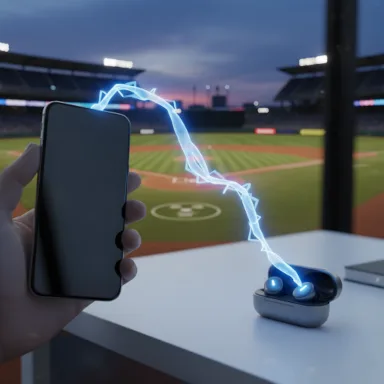
Bring Your Own Device. Two Ways to Deliver.
Why pay thousands for proprietary hardware? Relay-9 works with the phone in your pocket and the devices your players already own.
- Spoken calls to earbuds (Pro and Pro Plus). Relay-9 reads the pitch, location, and cue aloud through any standard Bluetooth earbuds paired to your Apple or Android phone.
- Silent calls to watches (Pro Plus). Each call arrives as a high-priority notification on every watch paired to your phone, with a fresh call number so nobody acts on a stale signal. Works with no internet at the field.
- Lowest-cost setup. We test with and recommend the Amazfit Band 7, so outfitting a battery or a full set of runners costs less than one proprietary earpiece.
Note: Multi-device smartwatch communication is intended for use where legal or allowed by your league/association.
Real-Time Analytics
Your Dugout Command Center
Every call you send is a data point. Relay-9 turns them into live gauges during the game and season trends after it.

First Pitch Strike & Fatigue Gauges
Animated gauges show your pitcher's FPS rate and a fatigue score built from pitch count, ball-rate creep, and late-game strike rate. Know when your ace is still dealing, or running out of gas.
Pitch Mix & Whiff Rate
A color-coded donut shows your pitch distribution at a glance, and the whiff breakdown splits strikes into looking versus swinging so you know which pitches fool hitters.
Pitch Effectiveness Table
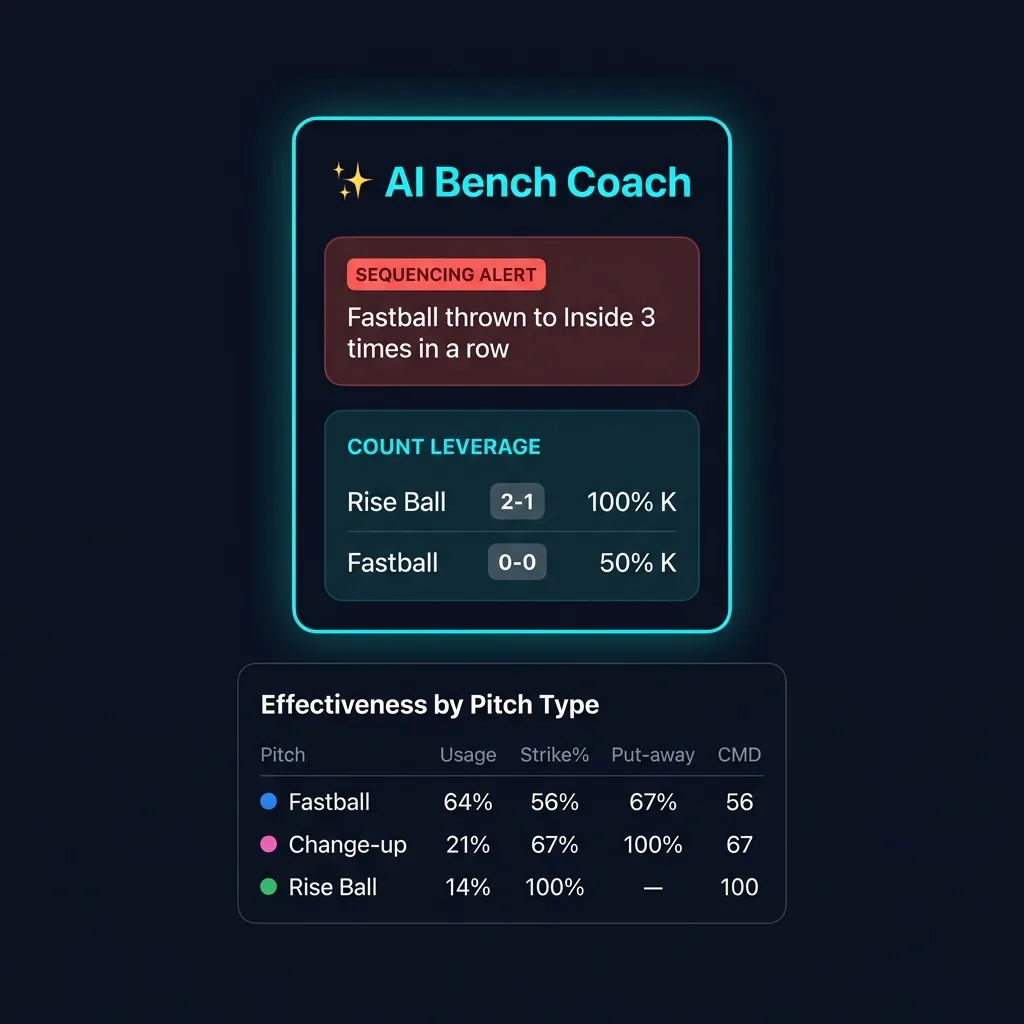
Per-pitch usage, strike rate, putaway rate on two-strike counts, and command score. Expand any row for bar charts and deeper stats.
Pitching Trends Across the Season
Roll every game into one view. Filter by pitcher and month to see strike %, FPS, pitch mix, and effectiveness over the whole season, not just tonight.
One-Tap CSV Export
Export a pitch log, a full analytics report, or an offense play-call log with a single tap. Perfect for film sessions, parent meetings, or recruiting packets.
Pattern Detection
Your AI Bench Coach
Traditional coaching relies on memory and feel. Relay-9 watches every call, spots the patterns an opposing coach would chart, and puts the alert on your dashboard while there is still time to change it.
- Pattern recognition that spots predictability before hitters do
- Live pitch suggestions based on the count and what has worked tonight, one tap to accept
- Fatigue monitoring so you never leave someone in too long
- Offense self-scouting with a Predictability score for your play calling
Live Alerts
Same pitch to the same spot three or more times in a row. You hear about it before the hitters catch on.
Flags overreliance on one pitch type in the last eight pitches, or the same first pitch at-bat after at-bat.
Breaks down your opening pitch across recent at-bats so you can vary the approach.
Shows which pitch gets the most strikes in each count. Know that your Rise Ball at 2-1 is money, backed by data.
Compares early-game and late-game strike rates per pitch. See exactly when a pitcher's stuff starts falling off.
On offense, finds the counts and runner situations where you call the same play most of the time.
Built for the Dugout, Not the Desk.
The details that matter at 7 p.m. on a Tuesday with two on and one out.
Pitcher Arsenals
Set which pitches each pitcher throws. The call screen shows only her pitches, so there is nothing to scroll past.
Batter & Lineup Tracking
Track jersey number and batting-order spot. The lineup advances on its own, and you can see what you threw the same batter last time up.
Change Pitcher Mid-Game
Swap pitchers without losing the inning, score, outs, or count. Each pitcher gets her own session and her own stats.
20-Step Undo
Fat-fingered a strike as a ball? Step back up to 20 actions. The count, outs, and log all follow.
Auto-Save & Resume
Every pitch is saved as it happens. If the phone dies or the app closes, Relay-9 offers to pick the game back up where you left it.
Co-Coach Sharing
Invite a second coach by email. Pitchers, opponents, pitch libraries, and game history sync between your two phones.
Works Without Signal
Calls travel over Bluetooth and games are saved on the phone first. No bars at the complex? Nothing changes. It syncs when you get home.
Pre-Game Delivery Check
A checklist that confirms permissions, Focus and battery settings, and watch connections, then sends a test signal so you know it works before first pitch.
Face ID & Fingerprint Login
Unlock the app in a second on game day. Your login stays in your phone's secure storage, and pitch text is hidden on a locked Android screen.
Rulebook Ready
One-Way. Receive-Only. The Pattern Every Rulebook Allows.
Relay-9 sends calls from the coach's phone to the players' devices. Players never transmit or record anything, which is the one-way, coach-to-player communication that USSSA, NFHS, and other sanctioning bodies permit. It is also the first question a tournament director will ask.
Rules vary by league and can change each season. Always confirm with your league or tournament director before your event.
Pro-Level Tech. Little League Budget.
Every plan starts with a free 14-day trial. Pick the plan that matches how you deliver calls.
RELAY-9 PRO
Spoken calls to earbuds
$9.99/mo
or $99.99/year
Free for 14 days, then billed through the App Store or Google Play
- Defense pitch calling and full game tracking
- Spoken calls to any standard Bluetooth earbuds
- Unlimited pitchers, opponents, custom pitches, and catcher cues
- 📊 Analytics Dashboard and season Pitching Trends
- 🤖 AI Bench Coach alerts and live pitch suggestions
- CSV exports and co-coach sharing
RELAY-9 PRO PLUS
Silent calls to watches, defense and offense
$19.99/mo
or $199.99/year
Free for 14 days, then billed through the App Store or Google Play
- Everything in Pro, plus:
- Silent visual calls to every smartwatch paired to your phone
- Offense Mode play calling with per-runner targets and Wipe Off
- Self-Scout Report and Offense Trends
- Pre-Game Delivery Check with test signal
Cancel anytime before day 15 and you will not be charged. Subscriptions are managed through your App Store or Google Play account.
Coaching more than one team? Contact us about your program.
Trusted by Coaches Who Love to Win
"Relay-9 completely changed our game. Our pitcher and catcher are in perfect sync, and our pace of play has improved dramatically."
Coach, 14U Travel Softball
"As a catcher, this is so much easier than trying to see signs from the dugout. I never miss a call now."
Player, High School Baseball
Frequently Asked Questions
Everything you need to know about getting the most out of Relay-9. Looking for setup steps? See the full setup guide.
Any standard Bluetooth earbuds that pair with your Apple or Android phone will work. Relay-9 speaks each call aloud (pitch, location, and catcher cue) through whatever earbuds are connected. You do not need to buy expensive, proprietary earpieces. Spoken calls are included with Pro and Pro Plus.
Relay-9 sends each call as a high-priority notification from your phone, so any watch that mirrors your phone's notifications can receive it. We test with the Amazfit Band 7 and Amazfit Bip 6 through the Zepp app and recommend them for the lowest hardware cost. Other watches that display phone notifications, such as Apple Watch or Garmin, generally work but are not officially tested, so run the in-app Pre-Game Delivery Check before game day. Watch delivery requires Pro Plus.
You can connect multiple Amazfit watches by pairing them directly through your phone's native Bluetooth settings, alongside the Zepp app. Once paired to your single phone, Relay-9 (on the Pro Plus tier) sends each pitch or play call to every connected watch at the same moment, so your pitcher, catcher, batter, and runners are all in sync.
No. Calls travel from your phone to earbuds and watches over Bluetooth, and every pitch and play is saved on your phone first. Your subscription stays unlocked when you have no signal, and your data syncs to the cloud (and to your co-coach) the next time you reconnect.
Offense Mode replaces the wristband card for your hitters and runners. Tap a play such as Steal, Bunt, Hit & Run, or Squeeze, choose who it is for (batter, runner on first, second, or third, or everyone), and send it to their watches in one tap. You can combine plays into a single send, wipe off a call you no longer want, and review a Self-Scout Report that shows how predictable your play calling looks to an opposing coach. Offense Mode is included with Pro Plus.
Electronic sign communication is widely approved in many rec leagues, travel ball organizations, high school associations, and college divisions. However, rules can vary, so you must always check with your specific league or tournament director first to confirm what is allowed. See our league-by-league legality guide for details on USSSA, NFHS, and other sanctioning bodies.
Absolutely not! Our Bring Your Own Device (BYOD) strategy is specifically designed to save you money. Because you can use devices you already own (or purchase highly affordable hardware like the Amazfit Band 7), your total costs are drastically lower than competing proprietary systems.
Relay-9 includes a full Analytics Dashboard that tracks your pitcher's First Pitch Strike rate, fatigue level, pitch mix distribution, whiff rate (looking vs swinging), and per-pitch effectiveness including strike %, putaway %, and command score. Pitching Trends rolls those numbers up across the season, filtered by pitcher and month. The AI Bench Coach provides real-time alerts for sequencing patterns, tendency overuse, first pitch predictability, count-specific leverage data, and stuff degradation when a pitcher's effectiveness starts declining. On offense, the Self-Scout Report and Predictability score show where your play calling has become easy to read. All analytics can be exported as a CSV file for post-game review.
Get in Touch
For support, questions, or multi-team program inquiries, please reach out.
For direct inquiries, email us at: support@eightyone18.com